.svg)
How to choose software for a healthcare facility (we covered 6 essential steps)

Quick summary
Choosing software for a healthcare facility requires understanding your needs, evaluating features, and ensuring scalability and compliance support. This guide outlines the essential steps hospitals should take. It highlights how Ruya’s real-time floor plans, mobile inspections, and healthcare-focused tools make managing complex facilities easier and more efficient.
Struggling to choose the right software for your hospital?
Many hospitals don’t struggle because they lack tools, but because they choose the wrong ones. A tool may look great in a demo, but in real-life settings, it can’t handle inspections, keep floor plans up to date, or support compliance when surveyors arrive.
The wrong tool slows teams down, creates data gaps, and increases risk across large systems.
In this Ruya article, we’ll show you six steps to choose software that truly supports your facility.
But first…
Why listen to us?
At Ruya, we work with large hospital systems across the country to help them streamline facility management, inspections, and compliance processes. Our platform is trusted by teams managing millions of square feet, giving us valuable insight into the unique needs of healthcare facilities. This experience enables us to offer practical advice on choosing the right software for your hospital’s specific needs.
What is healthcare facility software?
Healthcare facility software is a digital platform that helps hospitals manage their buildings, assets, inspections, and compliance in one place. It keeps floor plans up to date, tracks vendors and equipment, and supports maintenance and safety workflows, all from a mobile-friendly interface.
Why choosing the right healthcare facility software matters
- Ensures compliance: The right software organizes inspections, maintenance, and safety data, reducing audit risks and enabling efficient compliance with regulatory requirements.
- Saves time: Automated workflows and real-time updates reduce manual tracking, letting your team focus on patient care rather than paperwork.
- Maintains accuracy: Centralized floor plans, asset, and vendor data prevent errors that can arise from scattered spreadsheets or outdated documents.
- Improves collaboration: Teams, vendors, and consultants can access the same information instantly, enabling seamless communication across buildings and campuses.
- Supports scalability: A reliable platform grows with your hospital system, handling more buildings, assets, and inspections without creating additional complexity.
- Reduces operational costs: By streamlining processes and eliminating redundant work, the right software reduces administrative overhead and prevents costly mistakes.
6 steps to select the best software for your healthcare operations
1. Assess your facility’s needs
Choosing the right software starts with you understanding what your facility actually requires daily. Every hospital has its own mix of pain points, inventory needs, inspection demands, and compliance pressures, so you need a clear picture of the workflows the software must support.
Start by mapping your inspection processes, identifying documentation gaps, and pinpointing time-wasting areas for staff. Look carefully at how your teams manage:
- Floor plans
- Vendor records, and
- Asset information
This helps you see which tasks need better structure or faster access.
You should also consider your compliance requirements. Hospitals face constant survey activity, so your software must make it easier to gather evidence, view accurate drawings, and share information across teams.
Large campuses also depend on reliable building-level context. If your tools don't align with your facility's organizational structure, it can lead to missing data, outdated plans, and confusion during high-pressure situations.
When you have a clear understanding of your needs, you create a strong foundation for selecting software that actually supports your facility.
2. Prioritize core features
In choosing the best software, you must know which features matter most for daily operations. The goal is to reduce manual work, improve compliance, and help teams respond faster, not add another complicated system to their workflow. So, any software that falls short in any of these goals may not be a good fit.
Prioritize tools that:
- Support inspection management
- Provide detailed floor plans for easy navigation and oversight
- Handle asset and vendor management
- Include life safety plans
- Offer reliable mobile access for on-the-go tasks
A strong set of core features ensures your staff can perform routine tasks without switching between multiple platforms.
Platforms like Ruya strengthen these core needs with real-time floor plan updates that keep drawings accurate across large campuses. Ruya also supports mobile inspections with built-in code checklists, helping teams complete required tasks quickly and with fewer errors.

These capabilities streamline work, reduce errors, and offer a smoother experience than generic systems that lack healthcare-specific functionality.
3. Evaluate ease of use
Even the most powerful software fails if your team struggles to use it. An intuitive platform reduces frustration, speeds up adoption, and ensures staff across maintenance, safety, compliance, and administration can complete tasks with confidence.
Start by assessing how easily new users can navigate the system. Look for:
- A clean, simple interface
- Clear menus and workflows
- Minimal steps to complete everyday tasks
- Short training and onboarding time
- Smooth performance across devices
A strong platform should also support both desktop and mobile use. Field teams depend on quick access while walking through buildings or responding to issues. When a tool requires returning to a workstation to review drawings or update information, work slows down.
Ruya supports ease of use through its Native CAD and BIM Viewer, which lets teams view and annotate floor plans directly on a phone or desktop without installing plugins. This keeps focus on the work, not the software.
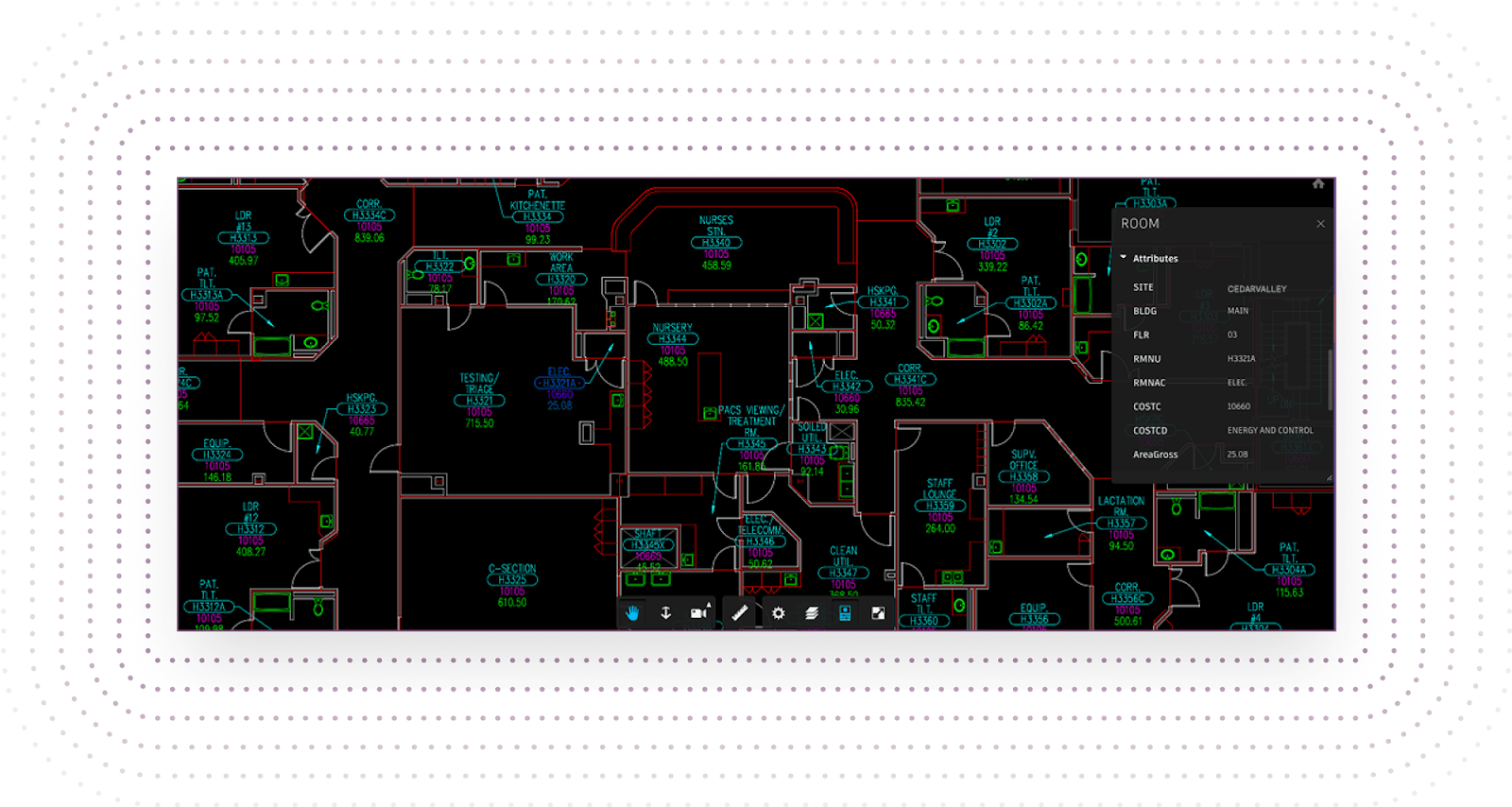
Choosing a platform that feels simple, predictable, and flexible ensures teams across all campuses can adopt it quickly and use it confidently in daily operations.
4. Check integration capabilities
Integration is essential for hospitals that manage many buildings, departments, and data sources. Your software should fit into the systems you already use, not force teams to rebuild processes or juggle disconnected tools.
When platforms don't integrate well, information becomes scattered, updates are missed, and teams waste time manually transferring data from one place to another.
Start by reviewing how the software handles CAD and BIM files, since drawings move through many hands across construction, facilities, and safety teams. A strong platform should support the formats your teams already rely on, such as PDF, DWG, and Revit. This ensures that everyone sees the same information without dealing with file conversions or version confusion.
You should also verify whether the software can connect with your existing applications. Hospitals use a mix of systems to store vendor details, asset records, and compliance documentation. Smooth connections reduce manual work and help maintain a continuous flow of accurate information.
Good integration lets teams work with confidence, knowing that their data stays aligned, current, and accessible across the entire facility.
5. Consider scalability and flexibility
Hospitals rarely stay the same size for long. New wings open, buildings get renovated, and teams expand as services grow. Your software needs to keep up with these changes without slowing down or forcing teams to rebuild their workflows.
A system that works for one building but collapses under multiple sites will create operational bottlenecks, data inconsistencies, and unnecessary costs.
Scalable software should be able to:
- Support multiple buildings and campuses
- Add new users without performance issues
- Handle increased inspection data, floor plans, and maintenance workflows
- Adapt to changing compliance and safety requirements
- Allow easy onboarding during expansions or mergers
Flexibility is equally important. Healthcare workflows vary between departments, facilities, and even teams. Your platform should let you adjust permissions, customize processes, and configure modules without relying on expensive custom development.
Ruya supports this need through its per-building organization, making it simple to manage large portfolios without losing clarity or control. Each building gets its own structured environment, which is ideal for systems with millions of square feet or facilities planning future expansions.
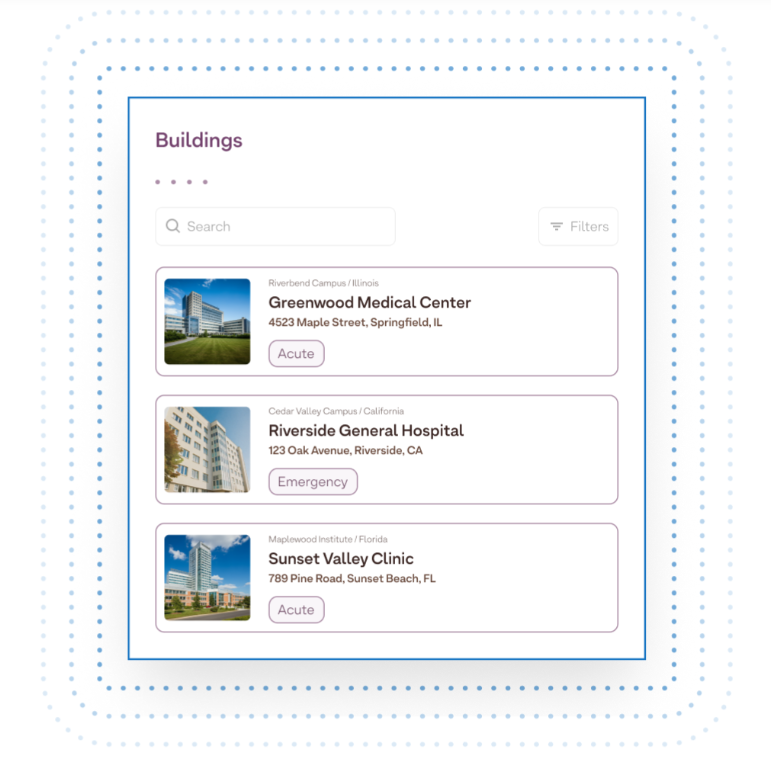
Choosing scalable, flexible software ensures your hospital stays efficient today and fully prepared for tomorrow’s growth.
6. Review vendor support and reliability
Strong vendor support can make the difference between smooth adoption and daily headaches. Every hospital depends on accurate information, current drawings, and reliable inspection workflows.
When software issues appear, teams need quick help from a provider that understands healthcare facility management. Slow support or unclear guidance can delay work, create compliance gaps, and add stress to already busy staff.
It is crucial to verify the vendor's experience in the healthcare sector. A provider with a strong track record in healthcare is more likely to understand the demands of inspections, life safety planning, and survey readiness.
You should also check how often the software is updated. Regular improvements show that the vendor is investing in long-term performance and keeping pace with hospital needs.
Stability is equally important. Hospitals need tools that remain reliable during high-pressure situations, from emergency repairs to survey visits.
Platforms like Ruya meet all the essential requirements for hospital facility teams. Designed specifically for healthcare, it supports every lifecycle phase, from design to facility maintenance. Ruya ensures floor plans, inspections, and safety plans stay consistently updated, helping large and evolving hospital systems stay organized and compliant.
Streamline healthcare facility management using Ruya
Choosing the right software can be overwhelming, especially because it affects safety, compliance, and daily operations. With so many options promising similar results, healthcare leaders need clarity, not guesswork.
Ruya simplifies that decision. Its real-time floor plan updates, mobile inspections with built-in code checklists, native CAD/BIM viewer, and per-building organization structure give hospitals the reliable, compliant, and scalable foundation they need.
If you are ready to make a better choice for your hospital system, get started with Ruya today. Explore how our platform supports real hospital workflows and helps teams stay organized, informed, and survey-ready.
.png)